Staring at a laptop or phone screen for hours has basically become daily life for most students. Whether you are clicking through endless lecture slides, typing out an assignment, or reading notes late into the night, failing to protect your eyes catches up with you fast. Most of us just ignore the dry, burning feeling and the dull headaches, thinking that is just the price of studying hard. But when you let that strain build up day after day, it quietly saps your energy, ruins your sleep, and makes it way harder to remember what you just read.
The truth is, you don’t need fancy gadgets or a totally new routine to fix this. Figuring out how to protect your eyes while studying usually comes down to a few basic, practical habits. Simple moves like fixing your desk lamp, pushing your screen back a bit, and taking quick breathing pauses can keep your vision sharp and clear. Here are a few easy, realistic ways to put in long study hours without burning yourself out.
How Long Study Hours Drain Your Eyes and Energy
When you study for hours, you forget to take a break. Staring at bright screens makes your body feel tired and heavy. If you want to protect your eyes and finish your homework easily, here is what actually happens.
You Forget to Blink
When you look closely at a screen, your eyes forget to blink. Blinking keeps your eyes wet, clean, and happy. Staring at slides or notes cuts your blinking in half. Without that fresh water layer, your eyes dry out fast and start to burn or itch like tiny bits of sand are stuck inside.
Screen Light Keeps You Awake at Night
Phones and laptops give off bright blue light. Fixing your desk lighting helps cut harsh glare, but staring at displays late at night still stops your body from feeling sleepy. When you finally turn off your laptop, your mind stays wide awake, making you feel groggy and tired the next morning.
Headaches Ruin Your Study Mood
The little muscles in your eyes work very hard to keep small words clear. Holding that focus for hours makes them sore and tired. That soreness quickly turns into an annoying headache right behind your forehead. Once your head hurts, it is almost impossible to think, simply because you forgot to protect your eyes from screen fatigue.
Practical Ways to Protect Your Eyes While Studying
You do not need to buy anything expensive to keep your vision safe. With just a few simple habits, you can study for hours without feeling beat. Here is how you can easily protect your eyes every single day.
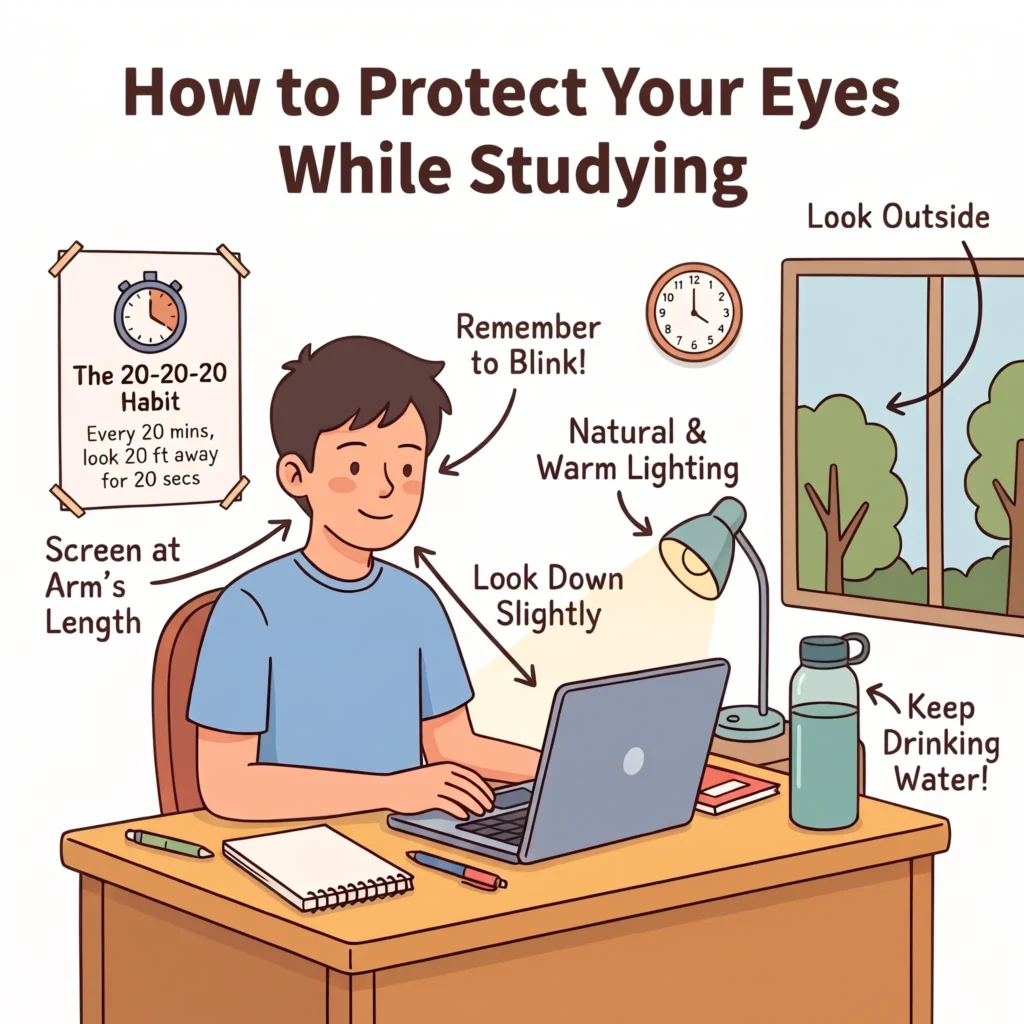
1. Use the 20-20-20 Habit to Reset Focus
Whenever you study, set a quick timer on your phone for twenty minutes. When the timer rings, look away from your screen and find something about twenty feet away, like a tree outside your window or a clock on the wall. Stare at it gently for twenty seconds. This quick break lets the tiny muscles around your eyes let go of tension so you can protect your eyes and get right back to learning with a clear head.
2. Position Your Screen at Arm’s Length
Sitting too close to your computer makes your face and forehead work extra hard. Stretch your arm straight out in front of you—your fingertips should barely touch the glass of your laptop or monitor. Also, lower your display just a tiny bit so you are looking slightly downward. Looking down keeps your eyelids lower and more relaxed, which keeps moisture trapped where it belongs.
3. Balance Room Light to Eliminate Screen Glare
Studying in a pitch-black room with only a shining laptop open is terrible for your focus. Your pupils keep stretching and shrinking because of the sharp contrast between the dark room and the white screen. Turn on a soft desk lamp or a warm room light in the corner. Matching the brightness of your workspace to your screen removes annoying reflections, making it simple to protect your eyes during late-night revision sessions.
4. Adjust Display Warmth and Text Scaling
Stop squinting at tiny sentences. Go into your display settings and make your font size bigger, around 125 percent, so words are large and easy to read from your chair. Next, turn on your computer’s built-in “Night Light” or warm display mode. This changes harsh, cold blue rays into a gentle, yellowish tone that feels like reading an old paperback book.
5. Stay Hydrated and Remember to Blink Often
When you get absorbed in a practice test, you naturally forget to close your eyelids. Make a conscious choice to blink fully every time you turn a page or finish a paragraph. Keep a large water bottle right beside your desk and take small sips between questions. Drinking enough water keeps your tear film full of fresh moisture, making it much easier to protect your eyes and finish your study tasks without any dry, gritty sting.
The Physical Side: Posture and Neck Alignment for Students
When you sit down to finish a long reading assignment, it is very easy to forget about your body. After an hour or two, you might catch yourself leaning forward, rounding your shoulders, and dropping your chin close to your desk. Bad posture puts heavy stress on your spine and pulls on the nerves connected to your head. If you want to protect your eyes and stay comfortable, fixing how you sit is just as important as fixing your screen.
Stop Slouching Over Your Desk
Hunching over your notebook or keyboard forces your neck muscles to carry extra weight. Your head is heavy, and tilting it forward strains your upper back and shoulder blades. This tightness travels right up to the base of your skull, making your face tense and your vision feel tired. Sitting back with a straight, tall spine makes breathing easier and helps you protect your eyes from the extra pressure caused by tight neck muscles.
Keep Your Feet Flat and Set Your Chair Right
The way your legs rest changes how your whole body sits. Adjust your chair so both of your feet flat on the floor, with your knees bent at a comfortable angle. If your feet dangle in the air, your lower back has to do all the balancing work, which pulls you right back into a bad slouch. A balanced sitting spot keeps your eyes lined up naturally with your desk so you never have to crane your neck just to read.
Take a 2-Minute Stretch Break
You do not need a full gym routine to reset your body. Every hour, stand up from your desk for just two minutes. Roll your shoulders backward in slow, gentle circles, and gently tilt your head from side to side to loosen your neck. Shaking out your arms and taking a deep breath brings fresh blood flow back to your head. These quick physical resets make it simple to protect your eyes, keep your energy high, and power through tough study sessions without feeling sore.
Warning Signs Your Eyes Need a Break (And How to Reset)
When you are deep into cramming for an exam, it is easy to brush off small warning signals your face is trying to send you. You might find yourself squinting through blurry sentences, rubbing at sharp red corners, or dealing with a hot, stinging itch on the surface of your eyelids. These symptoms are not just signs of everyday laziness; they are your body telling you that your natural tear shield has evaporated and your eye muscles are locking up from severe screen strain. Pushing through the pain just to finish one more chapter only makes things worse, setting you up for heavy morning headaches and light sensitivity the next day. If you want to protect your eyes before real damage starts, you need to catch these common clues early and take action right when your vision begins to blur. Learning to recognize that burning exhaustion is the smartest first move anyone can make to protect your eyes while tackling marathon revision days.
The moment you notice those telltale warning signals flaring up, step completely away from every monitor in the room. You do not need expensive eye drops to soothe irritated eyelids when a quick physical reset works wonders right at your study table. Start by rubbing your clean palms together briskly until they feel warm, then place your cupped hands gently over your closed eyes without pressing down on the eyelids. Breathe slowly and rest in that soothing darkness for thirty seconds to allow your overworked pupils to decompress. After that, walk over to your window, splash some cool water over your face, and gaze out at distant trees or the open sky for a full five minutes. Taking these short micro-pauses restores fresh blood circulation and makes it easy to protect your eyes so you can pick your books back up feeling refreshed. Making this gentle cooldown a regular desk habit is the most reliable way to protect your eyes and stay clear-headed from your first morning assignment straight through to your final late-night exam review.
Frequently Asked Questions
1. How often should I take a break during reading sessions?
Pause every 20 minutes. Look at something far away for 20 seconds so the tiny focus muscles can fully rest.
2. Do blue light glasses really help?
They can soften harsh glare, but taking quick screen breaks and blinking frequently helps your comfort much more.
3. Why does my vision burn when reading on a laptop?
You blink much less when staring at digital displays. Less blinking dries out the tear layer, making everything feel scratchy and hot.
4. Is it bad to work in a dark room with just a laptop open?
Yes. The sharp contrast between a bright display and a dark room forces your pupils to work overtime, causing quick headaches and fatigue.
5. How far should a monitor be from my face?
Keep it about an arm’s length away. Your fingertips should barely touch the glass when you reach straight out.
6. Can drinking water stop screen fatigue?
Yes. Staying hydrated keeps your body producing enough moisture so you avoid dryness during long revision sessions.
7. Does night mode actually make a difference?
Yes. It swaps harsh cool rays for warm yellow tones, which feels much softer during late-night reading hours.
Final Thoughts
Long study sessions do not have to leave you feeling completely wiped out. When you spend hours preparing for exams, taking simple steps to protect your eyes is what keeps your mind sharp and your learning speed high.
You do not need an expensive setup to make a real difference. Simply pushing your display to arm’s length, turning on a soft desk light, keeping a water bottle nearby, and using the 20-20-20 rule makes it remarkably easy to protect your eyes from screen fatigue. Build these quick habits into your daily study routine, and you will comfortably protect your eyes during tough revisions without ending the night with soreness and a pounding headache.
Pingback: Always Mentally Tired? How to Reset Your Energy Naturally